How to Apply for SASSA Unemployment Grant
The SASSA Social Relief of Distress (SRD) Grant was introduced to support unemployed South Africans and help mitigate the effects of economic hardship. The grant remains an important source of support for many beneficiaries who have no other income.
Here is a complete step-by-step guide for the SASSA Social Relief of Distress (SRD) Grant application process, including eligibility requirements, documents you need, and how to easily check the status of your application.
Who Qualifies for the SASSA SRD Grant?
To qualify for the SASSA SRD Grant, applicants must meet all the criteria listed below:
- A South African citizen, permanent resident, or a recognised refugee, asylum seeker, or special permit holder with valid documentation.
- Must be unemployed and not earning any income whatsoever.
- It must be an applicant who has not been receiving any other SASSA grant, any unemployment insurance (UIF) benefits, or financial aid from NSFAS.
- The age must be between 18 and 59 years.
- Must have a valid South African ID or an asylum/refugee permit issued by Home Affairs.
- Should have an active cellphone number and be registered in the applicant’s name.
- Must have a bank account or an approved alternative method of payment.
Documents Required to Apply for the SRD R370 Grant
Before applying, you must have the following documents ready:
- South African ID or asylum/refugee document
- Proof of residence
- Banking details (account number and bank name)
- Active cellphone number (used for application and verification)
- Proof of unemployment (not mandatory but may be requested for verification)
How to Apply for the SASSA SRD Grant
You can apply for the SASSA SRD R370 grant through any of the following methods:
1. Online via the Official SASSA SRD Website
The most convenient and widely used method:
- Visit the official SASSA SRD portal: https://srd.sassa.gov.za/sc19/application/auth.
- Enter your mobile number.
- Click on “Send SMS” and wait for the OTP (One-Time PIN).

- Enter the OTP to verify your number.
- Complete the application form with your details, banking info, and employment status.
- Accept the declaration and consent terms.
- Submit your application.
2. Via WhatsApp
An easy mobile option for users with limited internet access:
- Save the official SASSA SRD WhatsApp number: 082 046 8553
- Send a message saying “Hi”.
- Follow the prompts by replying with “Help” and then “SRD”.
- You will receive a step-by-step guide to submit your application.
- Provide your ID number and cellphone number, then follow the instructions to complete the process.
3. Via Moya App
A data-free application method available on smartphones:
- Download the Moya App, which allows data-free access to the official SASSA SRD application portal.
- Open the app and tap on the “SASSA SRD Grant” option.
- Enter your ID number and phone number.
- Fill out the form and submit it.
Check out this article on the Moya App it has much more information.
What Happens After You Apply?
Once your application is submitted:
- SASSA will verify your identity, citizenship, and income status using data from various government and financial institutions.
- You will receive an SMS confirmation acknowledging receipt of your application.
- Monthly verification is done to ensure continued eligibility.
- You will get a notification if your application is approved, pending, or declined.
How to Check Your SASSA SRD Grant Status
You can track your application status easily by following the steps below:
Online
- Visit https://srdgrantguide.co.za/
- Enter your ID number and cellphone number.
- Click “Check Status” to view your monthly status.
Via WhatsApp
- Message “Status” to 082 046 8553.
- Follow the prompts to view your application status.
Reasons for Application Rejection
If your application is declined, it could be due to the following:
- You are currently receiving another SASSA grant or UIF benefit.
- Your bank transactions reflect income.
- The ID number provided does not match Home Affairs records.
- Your application is a duplicate.
How to Appeal a Declined SASSA SRD Grant
If your application is rejected unfairly, you can submit an appeal:
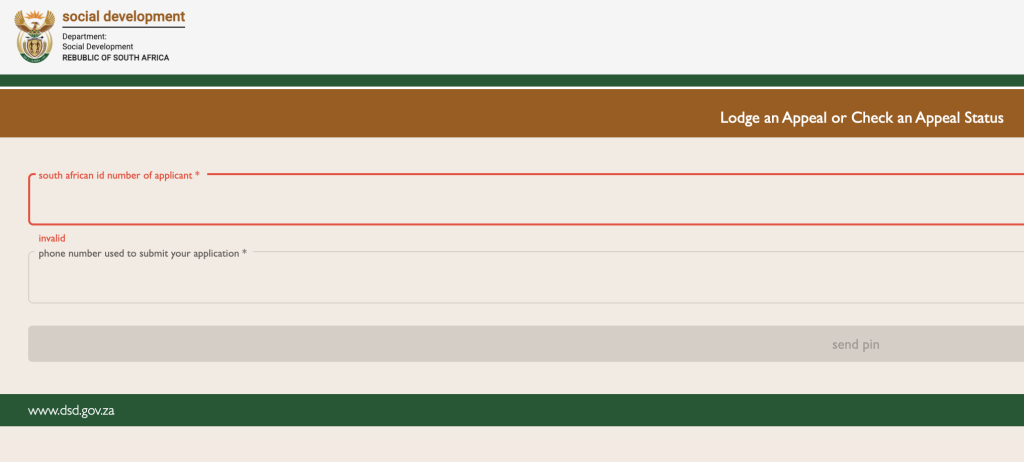
- Enter your ID number and cellphone number.
- After submitting, you will need to enter the PIN sent to your phone.
- Select the month you want to appeal.
- State your reason and submit.
- Appeals must be submitted within 90 days of the rejection decision.
- Track the appeal status through the same portal.
How Will You Receive the Grant?
If your application is approved, payment will be made through one of the following options:
- Bank deposit (recommended)
- Post Office payouts (availability subject to SASSA arrangements)
- Retail partner stores like Pick n Pay, Checkers, Shoprite, Boxer
- Cash Send services using your phone number for verification
How Long Does It Take to Receive Payment?
If approval is granted, the payment will, therefore, be reflected in your bank account/retail payout within 7-10 working days.
Important Tips to Avoid Delays
- You must have real banking details that are correct and match your ID.
- Always use a cellphone number registered in your name.
- Respond quickly to SASSA communication or verification messages.
- Regularly check your status online or via WhatsApp.
- Appeal promptly if declined.
Frequently Asked Questions
Can I reapply for the R350 grant every month?
You only need to apply once, but your eligibility is assessed every month. If your status changes, your payment may be stopped.
Can I apply without a bank account?
Yes, but you will need to choose a Cash Send or Retail Store collection option.
What if I changed my cellphone number?
Update your details on the SASSA SRD portal immediately to avoid missing communications.
Contact SASSA for Support
Use the following contacts:
- Call Centre: 0800 60 10 11 (Toll-Free)
- Email: srd@sassa.gov.za
- SASSA Head Office: Pretoria, South Africa
Conclusion
Applying for the SASSA SRD grant is simple if your details are correct and you follow the steps properly. Be sure to check your application status regularly, keep your contact information up to date, and use only official SASSA channels for communication.